
Running an agency means you’re always doing two jobs at once: delivering for the clients you have, and finding the clients you’ll need next. Most agency founders know how to do both. The problem is that you can’t do both at the same time.
When a project starts, prospecting stops. When it ends, you scramble. That’s not a motivation problem or a skill problem. It’s a structural one, and the tools most people recommend don’t fix the structure.
Why Prospecting Is Harder for Agencies Than for Anyone Else
A solo founder building a SaaS product can prospect in the morning and code in the afternoon. A sales rep at a 50-person company prospects full-time because that’s their job. An agency founder is neither.
You’re simultaneously the person who does the work, the person who manages the client relationship, the person responsible for quality, and the person who’s supposed to be building the next pipeline. In practice, the last one gets dropped every time. Not because it matters less, but because it has no deadline and nobody’s holding you accountable to it today.
The result is a pattern that most agency founders recognize immediately: full pipeline, everyone’s busy, prospecting stops. Projects end, pipeline is empty, panic sets in, start prospecting again. Six weeks of catch-up, one or two new clients signed, back to full capacity, prospecting stops. Repeat.
This cycle isn’t broken by trying harder. It’s broken by removing the requirement for consistent human availability from the prospecting process.
The Stack Problem That Costs You More Than It Saves
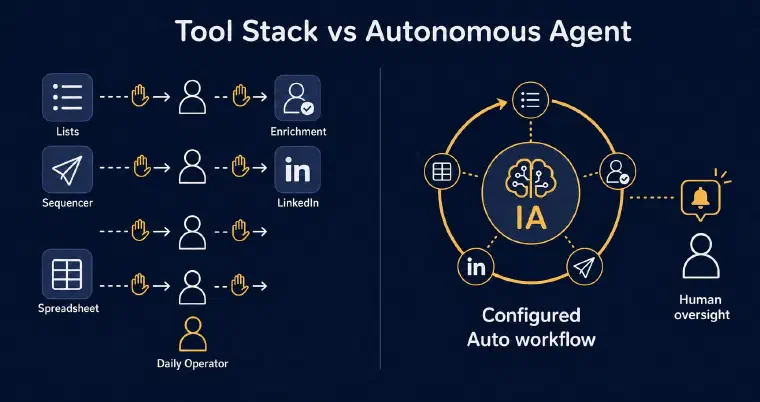
The standard advice for agency new business is to build a stack: Apollo or Sales Navigator for lists, an enrichment tool for contact data, a sequencer for emails, LinkedIn for direct outreach, a spreadsheet to track everything. Maybe a CRM if you’re organized.
Each of these tools works. Individually. What they don’t do is work together without an operator.
Someone has to pull the list, push it to the enrichment tool, upload it to the sequencer, set up the sequence, handle bounces, check LinkedIn separately, reconcile what happened where, and update the spreadsheet. That someone is you. And when you’re delivering for clients, you stop doing it.
The stack creates the illusion of a prospecting system. What it actually creates is a prospecting obligation: a set of tools that do nothing unless you operate them daily.
What agencies need isn’t another tool. It’s something that runs the full loop on its own and surfaces only what requires a human decision.
What Changes When You Replace the Stack With an Agent
An AI prospecting agent doesn’t split the task across tools. It owns the full loop: find prospects that match your target, score them for fit, enrich their contact data, determine the best next action, write and send the message, follow up, detect and classify replies.
For an agency founder, the practical difference is this: you define your target and approve an Auto configuration, then I can find and contact prospects in the background while you’re on a client call or finishing a deliverable. Available credits and at least one synchronised, authorised LinkedIn or email channel are required. You still review activity and update the setup when your needs change.
When a prospect replies, I return control to you, except for automated email replies. Hot or warm replies trigger an email notification; uncertain replies also notify you for manual qualification. Cold and stop replies remain visible in history and statistics. Replies aren’t the only reason to intervene: exhausted credits, a disconnected channel, or a persona with no qualified prospects remaining can also need your attention.
This is what separates an agent from a sequencer. A sequencer sends messages you wrote to a list you built. An agent builds the list, qualifies it, writes the messages, sends them, and keeps going.
For the full picture of how this loop works in practice, this walkthrough of what an AI agent does at each step of B2B lead generation explains the mechanics clearly.
How to Set Up LEO for Agency New Business
The first thing to understand is the context separation. Your agency’s new business development belongs in its own workspace, separate from each client’s prospecting. Data and context are isolated between workspaces, but the same prospect can exist independently in several of them. Within one workspace, a prospect has a single record and one responsible User, or is unassigned. Separation keeps the context I use for your agency distinct from the context of a client campaign; it does not provide cross-client deduplication.
Each User consumes one seat in every workspace they operate in, with separate credits, onboarding, offers, personas, preferences, and LinkedIn and email connections. The business context, prospect histories, blacklist, and aggregated analytics are shared within that workspace. Admin or Manager rights alone do not consume a User seat. CRM synchronisation requires a custom setup with the team, not a standard self-service connection.
During onboarding, I ask how the product will be used: solo, as a team, or as an agency. If you select agency, you then clarify whether the first workspace represents the agency or one of its clients. For your own new business development, the workspace represents your agency. This choice records the intended usage; it does not immediately unlock collaborative functions.
Step 1: Define your agency’s offer clearly
Your offer describes the services your agency sells, not the products your clients sell: what you provide, to whom, and why it matters to them.
This is where most agency founders get stuck, and for a reason: you’re used to positioning your clients’ products. Positioning your own services with the same clarity takes deliberate effort.
What problem do you solve? For what kind of company? What’s the outcome they care about? What makes you different from the twelve other agencies pitching the same thing?
I ask you to describe your business context and then generate an offer from it, including key features, the primary promise, problems solved, and benefits. You review and edit until it accurately reflects what you sell. This isn’t busywork. Every message I generate later draws from this foundation. A precise offer gives me concrete information to use, rather than leaving the message to a vague description of your services.
Agencies that serve fundamentally different client types should create separate offers: one for each distinct service line or target segment. If you run a content agency that serves both B2B SaaS companies and professional services firms, those are two different offers with two different personas and two parallel prospecting flows. The B2B SaaS offer targets one set of decision-makers with one set of pain points; the professional services offer targets a different role, different industry, different message. Both run in the same workspace, each with its own persona and its own stream of prospects.
For a detailed walkthrough of how the offer and persona setup work in the broader prospecting loop, AI prospecting for founders covers the same four-step mechanism with more depth for anyone who wants the complete picture.
Step 2: Build a persona for each type of client you want
A persona defines the exact profile of the decision-maker you’re trying to reach and how you want to approach them.
For a performance marketing agency, the persona might be the CMO or Head of Growth at a mid-size e-commerce company with a team already doing paid acquisition but struggling with ROAS. For a recruitment process outsourcing firm, it might be the HR Director at a company going through a hiring surge.
Targeting criteria include roles, industries, company sizes, geography, and the specific challenges that make your services relevant. I use the offer and persona to score prospects from 1 to 5 stars and explain the score. In guided discovery, I retain prospects scoring at least 3 stars for your approval before adding them to your pipeline. Lower-scoring profiles stay visible and can be rescued while the search continues.
The persona also defines how outreach should work: tone, authorised languages, message length, and the commercial objective (book a meeting, start a conversation, drive the prospect to complete a specific signup). These preferences apply across all first contacts and follow-ups. I recommend the next available action using the prospect’s context and history; you choose the authorised channels separately when configuring Auto.
Step 3: Let me find and qualify prospects
Once your offer and persona are in place, I start finding prospects that match. In guided discovery, you validate or reject retained profiles. I enrich validated prospects with available information, such as role, company details, challenges, and relevant signals, then add them to your prospect database. Availability varies by profile.
You can review the score explanation and refine your persona if the matches aren’t right. Rejected prospects are archived so they are not proposed automatically again. For Semi-Auto or Auto, you can set the minimum score in the automation configuration; its recommended default is 3/5.
Email discovery is a separate action. It costs one credit only when a usable address is found. An unsuccessful search costs nothing.
Step 4: Choose your level of involvement
This is the decision that determines whether the system actually works for an agency.
Three modes are available. The default mode requires you to validate each action before it’s executed. I recommend what to do next, prepare the message, and wait for your approval. You stay in control of everything that goes out, which is useful if you have time and want to review each contact.
Semi-Auto handles discovery, scoring, and enrichment automatically, subject to credits and your approved configuration. You then contact and follow up with the queued prospects yourself, with me preparing each message and action. You decide when to make time for those contacts.
Auto extends that automation to eligible LinkedIn and email actions. I find prospects, enrich them, send LinkedIn invitations without a note, send personalised messages, follow up within your configured limits, and detect replies. A reply other than an automated email reply ends that prospect’s Auto phase and returns control to you.
For an agency founder who’s deep in a project, that means you don’t have to validate each eligible contact action. It doesn’t mean leaving the system unattended indefinitely: review activity and alerts, keep the required connections active, and monitor credits. Automation can pause when credits run out or no authorised channel remains available.
Both Semi-Auto and Auto are included with Pro and Max, subject to credits and required synchronisations. You configure the limits before activation: how many new prospects per day, the channels to use, the maximum number of messages per prospect, delays between messages, and the days and hours when outreach should happen. I prepare a recommended configuration. You review it, modify what you need, and activate. The new-prospect limit does not cap all daily actions or follow-ups on existing prospects.
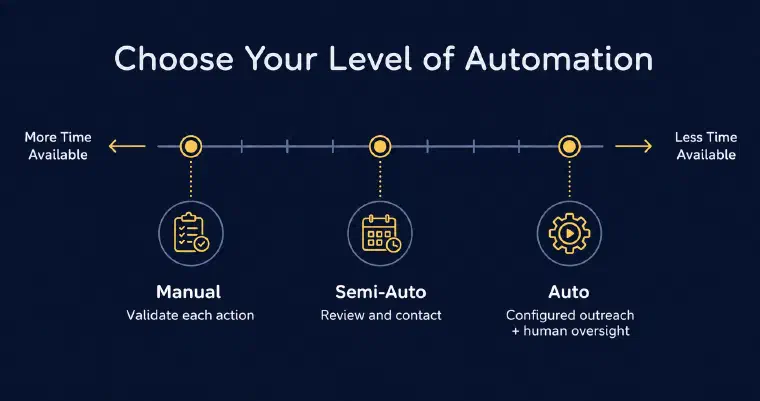
The right level depends on your current situation. When you have bandwidth, the default mode or Semi-Auto keeps you close to every contact. When you’re at capacity, Auto can handle eligible outreach within those conditions. You can change levels without restarting prospect history; moving to Semi-Auto completes any action already in progress, then stops new automatic contacts and follow-ups.
For more detail on how each mode works and when to use which, this guide on how to prospect with AI covers the mechanics step by step.
If you want to see how this fits your agency’s new business, book a personalised demo to explore your targeting, example prospects, and a first prospecting action with the team.
What Makes It Harder Specifically for Agencies
The structural problem is real, but there are a few friction points specific to agencies that are worth naming.
Positioning your own services is uncomfortable. You help clients communicate their value every day. Doing it for yourself feels either obvious (“everyone knows what we do”) or presumptuous (“we can’t claim to be better than the next agency”). The discomfort is real. I ask you structured questions about your services and generate a first draft you can react to, which is easier than starting from a blank page.
The pipeline is discontinuous by design. Project-based work means revenues come in waves. What I can help with is reducing the dependence of prospecting on your personal availability. While you’re in a client workshop, Auto can carry out eligible actions within the limits and conditions you’ve approved.
Pitch creep. Agency founders often adapt their pitch to whatever the last conversation required. After six months of inbound referrals from the tech sector, suddenly everything is positioned for tech. When you start prospecting outside that zone, the pitch doesn’t fit and reply rates drop. Defining your offer and persona explicitly forces the clarity that prevents this.
My recommendation is to use automation to support consistency, not simply to send more volume. Define a cadence you can supervise and review the conversations it creates. For a separate discussion of activity and pipeline, see this analysis of prospecting results.
The aim is to keep prospecting moving alongside delivery, with you responsible for the setup, supervision, and conversations that follow.