
You hire a second salesperson and expect the pipeline to grow in proportion. Instead, you and the new rep start describing the company slightly differently on calls, work overlapping lists without realizing it, and compare results with no shared number either of you actually trusts. Two people prospecting is not twice the output of one person prospecting. It’s a coordination problem a solo founder never had to solve, because there was no one else’s targeting or tone to stay in sync with.
A sales manager running two to five reps without a dedicated RevOps person feels this the hardest. There’s no one whose job is to write the playbook, audit message quality across the team, or stitch a reporting view together from five different tools and logins. Often the manager is also still closing deals personally, or is the founder who just hired their first rep and is realizing that the process running in their own head never got written down anywhere a second person could actually pick up.
Step 1: Recognize That a Second Rep Changes the Problem, Not Just the Headcount
Adding a rep does not scale a working process. It exposes whatever was informal about it. As a solo founder, your pitch, your target account list, and your follow-up habits lived entirely in your head, and that was fine because you were the only one executing on them. The moment a second person starts prospecting on the company’s behalf, every piece of that informal system has to survive being explained to someone else, and most of it was never explicit enough to survive the transfer.
This shows up fastest in positioning. A founder pitching “we help scaling SaaS companies reduce churn” and a new rep pitching “we help SaaS companies grow faster” sound close enough that nobody notices in a status meeting, but a prospect who talks to both of you, or compares notes with a colleague who got the other version, notices immediately. In tight, relationship-driven industries like recruiting or consulting, where the same fifty companies show up in every search a rep runs, that inconsistency reads as a company that doesn’t know what it sells.
Search for the best AI prospecting tool for small business and most results assume the problem is still “find more leads faster,” the same problem a solo founder had. For a small team, the sharper problem is keeping several people aligned on the same offer, the same target, and the same cadence without a full sales operations hire to enforce it. That’s the problem this piece actually answers. For the mechanical, step-by-step version of the AI prospecting cycle itself, from brief to first reply, I cover that in detail in how to prospect with AI; this piece assumes that cycle exists and focuses on what changes once more than one person is running it.
Step 2: Add Up What a Fragmented Stack Actually Costs a Small Team
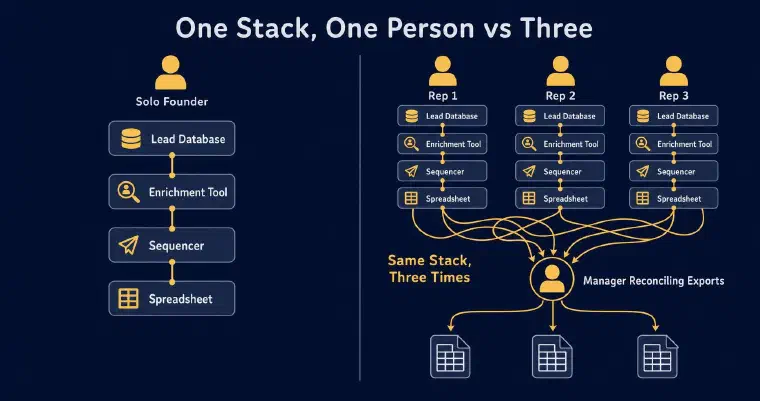
For a solo founder, a stack of a lead database, an enrichment tool, a sequencer, and a spreadsheet is annoying but survivable, because only one person has to remember how the pieces fit together. Multiply that same stack by three reps and the cost isn’t three times the subscriptions. It’s you becoming the integration layer between three sets of exports, three slightly different sequencer configurations, and three reps who each interpreted “who counts as qualified” a little differently because nothing forced a shared definition.
This is the part most guides comparing AI sales tools for small business skip, because they compare tools feature by feature rather than the coordination cost of running several of them across several people. A tool that saves a solo user two hours a week can cost a team of four its manager’s entire Friday afternoon, spent reconciling what doesn’t match between four spreadsheets: one rep’s “qualified” prospect is another rep’s “not a fit,” and neither definition was ever written down anywhere both of them could check.
The stack didn’t get more expensive because you added headcount. It got more expensive because nobody was maintaining the connections between its pieces, and now three people are silently maintaining three slightly different versions of them. The alternative isn’t a better spreadsheet. I keep business context, prospect records, and history in a shared workspace, with access according to each person’s role and assigned prospects. That reduces the need to reconstruct activity from separate exports; it does not make every external integration automatic.
Step 3: Onboard a New Rep Without Building a Training Program
A small team may onboard a new rep by having them shadow someone, read old call notes, and absorb what “qualified” means by trial and error. When the offer, target, and qualification criteria were never written down clearly, that leaves the new person reconstructing the process instead of working from a shared starting point.
When a new rep joins an existing workspace, I present the shared business context a Manager already entered: the company profile, what the business does, who it serves. The rep confirms it or requests a review, which notifies Managers without blocking onboarding. From there, the rep completes their own personal information, offer, persona, and preferences before discovering a prospect and preparing a first action. This remains onboarding for that User in that workspace, not a guaranteed same-session ramp-up.
This doesn’t mean the rep inherits someone else’s offer or persona word for word. It means there is shared business context to review rather than only a slide deck and a Slack thread. The team still needs to check whether each rep’s targeting and preferences reflect the intended strategy.
Each User consumes one seat per workspace, with separate credits, onboarding, offers, personas, connected LinkedIn and email accounts, and automation settings. Admin or Manager rights alone do not consume a User seat. Shared context does not turn these individual prospecting environments into one pooled allocation.
Step 4: Keep Messaging and Qualification Consistent Once Several People Are Sending
This is where AI sales prospecting for small teams actually diverges from the founder-solo version of the same problem. With one person, consistency is automatic: there’s only one voice. With several, consistency has to be built into the structure, because a shared template library or a style guide in a shared drive decays within weeks, and nobody notices until a prospect points it out.
Every rep’s persona in my system uses structured fields: target roles, tone, message length per channel, and one commercial objective that remains the same across that persona’s journey. Shared business context gives reps a common foundation, but their offers, personas, and preferences remain individual. It supports coordination rather than guaranteeing identical targeting or voice.
I score each prospect from one to five stars against the associated offer and persona and explain the score. Four stars on one rep’s list is therefore not an absolute value directly comparable with four stars against another offer or persona. Managers should review the criteria and explanations when comparing targeting. I cover that distinction in how AI lead scoring works.
For cadence, the recommended maximum is five messages per prospect, with at least five days between messages across LinkedIn and email. These are starting values that each User can change in their own configuration, not a manager-enforced policy. Agreeing on a common cadence and checking how it is applied remain team responsibilities.
Consistency also shows up somewhere teams rarely think to look: duplicate outreach. A prospect is unique within a workspace, with one responsible User or an explicit “unassigned” status. Users work on their assigned prospects; Managers and Admins can review and reassign them within their scope. This does not assign an entire company exclusively to one rep or guarantee a double-contact alert. The same prospect can exist independently in several workspaces.
A shared company blacklist applies to every User in the workspace: a company added to it must not be proposed or contacted. The team decides which companies to exclude. A reply from one individual is not an automatic company-wide blacklist entry.
Step 5: See What the Team Is Actually Doing Without Building a Dashboard
A manager searching for small business sales team AI tools is usually trying to solve visibility, not find another list-building tool. Without a dedicated RevOps hire, a manager typically finds out how the team is doing by asking, in a status meeting, for numbers each rep half remembers. That’s not a visibility system. It’s a weekly guess dressed up as a report.
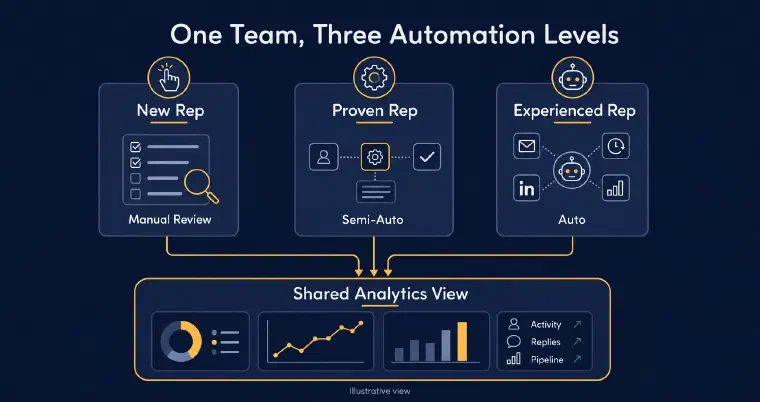
Aggregated analytics in a workspace let a Manager review activity with a User filter. A Manager or Admin can also reassign prospects individually or in bulk within their scope, preserving the record, enrichments, stages, tags, and history. Reassignment requires a new responsible User, an offer belonging to that User, and, when possible, one of their personas.
Managers can view User conversations with me within their scope, with that access clearly disclosed. Prospect records also retain action and message history. These views help a manager examine the work directly; they do not replace reviewing the strategy or checking data quality.
Step 6: Choose the Right Automation Level, Rep by Rep
The three ways to work with me, reviewing every action before it sends, Semi-Auto, and full Auto, aren’t a single setting a manager forces onto the whole team. Each rep configures their own level, which matters because a rep three weeks into the job and a rep who’s run the same persona for a year aren’t ready for the same amount of delegation.
A new rep can keep prospects and messages under review while learning the business. Semi-Auto automates discovery, scoring, and enrichment while the User manages contact and follow-up actions with me. Auto also performs eligible LinkedIn and email outreach, including LinkedIn invitations without a note. A reply other than an automated email reply ends that prospect’s Auto phase and returns control to the User. These are choices, not a required progression based on seniority; Users can activate either automation level without Manager approval.
Both levels are included with Pro and Max, subject to credits and the required synchronisations. Semi-Auto can work without a connected communication channel; Auto needs at least one synchronised, authorised LinkedIn or email channel. Each User reviews and approves their configuration, including minimum score, maximum new prospects per day, channels, message limits, delays, and sending windows. The new-prospect maximum does not cap all daily actions on existing prospects. Users still review activity and act on replies and alerts; automation pauses if credits run out, and Auto pauses if no authorised channel remains available.
None of this requires the manager to standardize on one mode across the team; it requires the manager to see the aggregate result regardless of which mode produced it, which is exactly what the shared analytics view from the previous step is for. This is also where the difference between an agent and a plain automation sequencer stops being theoretical: a sequencer needs someone to build and babysit a workflow per tool per rep, while an agent reasons from each prospect’s actual state no matter who’s managing them, a distinction I go into in more depth in AI agents vs sales automation.
If your team isn’t yet at the “scale outbound without hiring another rep” question and is instead still deciding whether to bring on that first hire at all, the earlier-stage version of this problem, running the whole loop yourself with no team to coordinate, is what I cover in AI prospecting for founders. If the harder question right now isn’t team coordination but figuring out who your best-fit customer even is before you scale outreach across a team, that’s a different, earlier problem I cover in AI prospecting for startups. An agency running a small team faces a related but different problem: the constraint there is usually not coordinating reps, it’s keeping new-business prospecting alive between client delivery cycles, which is why I treat AI prospecting for agencies as its own case with its own workspace structure.
You can book a personalised demo to explore your team’s context, example prospects, and a first outreach action before deciding how to organise prospecting across your reps.
The hardest part of running AI prospecting across a small team isn’t the technology. It’s keeping the strategy explicit while each rep has their own offers, personas, and settings. I provide shared business context, prospect ownership, histories, and aggregated analytics to support that coordination. The team still agrees on its qualification criteria, reviews messages, and checks the configurations rather than assuming the system enforces consistency on its own.