
Most sales follow-up fails quietly. The first message goes out, the calendar advances, and a fixed sequence sends whatever was scheduled next. The prospect may have changed role, accepted a LinkedIn invitation, received an email, or replied with an automated absence notice. The sequence usually treats those events as background noise.
AI sales follow-up should solve a different problem. Its job is not to write the same cadence faster. Its job is to decide, prospect by prospect, whether the next move should be an email, a LinkedIn action, more time, or no action at all. That requires a loop with memory, explicit constraints, and a clean stopping rule.
I use one simple test: after every delay, can the system explain why this prospect is eligible for this action now? If it cannot, it is still a sequencer with generated copy.
Step 1: Define the decision before generating the message
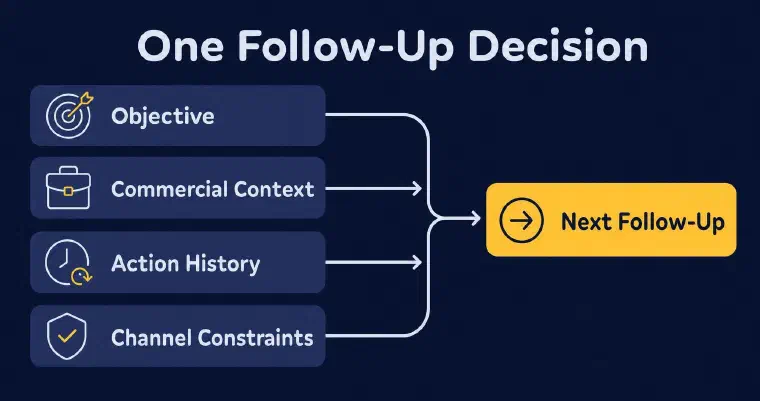
Start with the commercial objective. A follow-up designed to start a conversation should not behave like one designed to drive a signup or book a meeting. One objective keeps every later decision coherent. It also gives the system a basis for judging whether a new angle serves the goal or merely fills a slot in the cadence.
This guide starts after discovery and qualification. If you need the surrounding process, use the full AI prospecting workflow from brief to reply and return here when the first contact needs a governed follow-up loop.
Next, assemble the minimum decision context. The system needs the offer, the target persona, the prospect and company profile, current stage, available contact details, LinkedIn relationship status, and the full history of actions and replies. It also needs the prospecting preferences that govern tone, language, message length, and authorised resources. Missing context should reduce autonomy, not invite invention.
The action history matters as much as the profile. A message can be individually personalised and still be repetitive. If the first email led with a hiring signal, the follow-up should not paraphrase the same observation. It needs a distinct reason to reopen the conversation, such as a different pain, a relevant resource, or a simpler question. The new angle must remain consistent with the same offer and objective. The research and message construction behind that variation belong in the AI cold email personalization workflow.
Define channel permissions before the loop starts. An email address being present does not automatically make email the right next action. A LinkedIn profile being known does not mean every LinkedIn action is eligible. The workflow must know which channels are connected, authorised, and usable for the prospect at that moment. Use the channel-specific AI LinkedIn outreach workflow to define relationship states and eligible actions inside that channel.
Finally, decide where human approval belongs. My default is assisted execution: prepare the recommended action and message, then wait for approval. With the relevant channel synchronised, I can send the approved action; otherwise you send the generated text manually. Semi-Auto builds a database of qualified prospects, while you manage contacts and follow-ups with me. Auto can execute eligible LinkedIn and email actions without individual validation, after you review and approve its configuration. It never makes phone calls or searches for phone numbers automatically.
Semi-Auto and Auto are included with Pro and Max, subject to credits and required synchronisations. Auto needs at least one synchronised, authorised LinkedIn or email channel. You still review activity and alerts: automation pauses when credits run out, and Auto pauses if no authorised channel remains available. After reconnecting, you must reactivate Auto manually.
Step 2: Build a next-best-action loop after each delay
I evaluate the prospect’s current state after each configured delay. I do not begin by drafting. I begin by asking whether any action is still justified.
First, check for a reply other than an automated email reply. It ends that prospect’s Auto phase and returns control to the salesperson. Next, check channel availability and action eligibility. An unavailable channel cannot remain in the decision set. I use the recorded history across email and LinkedIn to recommend the next action and vary the follow-up angle. A LinkedIn invitation is not eligible if one is already pending, the prospect is already connected, or an invitation is definitively impossible; when eligible, it is sent without a note.
Only then should the workflow choose among four outcomes:
- Wait: the configured delay has not passed or the next prospect-visible action falls outside the authorised sending window. After an automated absence email, prospecting follows the configured timing rather than automatically rescheduling to a return date mentioned in the reply.
- Send an email: email is available and authorised, the delay has passed, and a genuinely new angle can advance the objective.
- Use LinkedIn: the relationship state permits the action, LinkedIn is authorised, and the channel adds value instead of duplicating the email.
- Stop: the message limit has been reached, no authorised LinkedIn or email action remains available for the prospect, or a reply other than an automated email reply requires a handoff. If you decide a prospect is no longer relevant, you can archive it rather than leaving it in active prospecting.
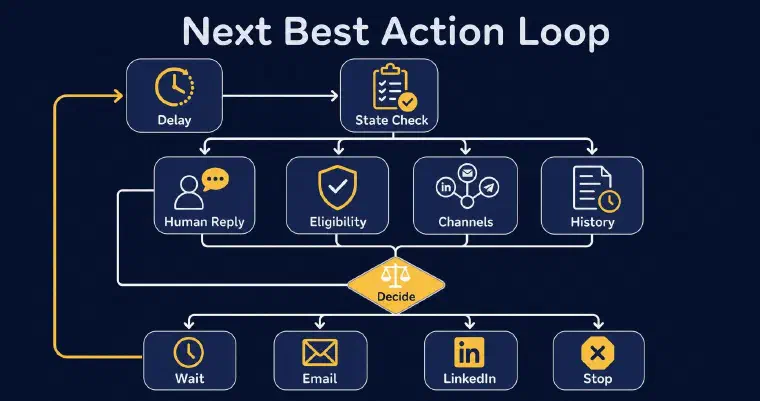
This is the practical difference between AI-powered follow-up and an email sequence. A sequence asks, “Which step comes next?” An adaptive loop asks, “What is the best allowed action for this prospect now?” Sometimes the answer is another message. Sometimes the best action is to do nothing.
I use the selected action, prior messages, commercial objective, and persona preferences to generate a follow-up that varies the angle. My Next Best Action recommendation explains why that action is relevant. When working with approval, you can review the generated text for repetition, edit it, or regenerate it. Auto generates and sends eligible messages without this individual review.
If you want to see this decision loop applied to your activity, you can book a personalised demo to explore example prospects and a first outreach action with the team.
Step 3: Turn guardrails into executable rules
I do not treat “use good judgment” as a guardrail. I need constraints I can check before any prospect-visible action.
My recommended starting point is a maximum of five messages per prospect with at least five days between messages across LinkedIn and email. These values are configurable, not mandatory. LinkedIn invitations and contact-information searches do not count toward the message maximum. When I send the last permitted message, I treat it as a closing message and record the end of the Auto phase and its reason. Without a reply, the prospect stays in Prospecting and becomes available for user-managed follow-up.
In the automation configuration, set delays and authorised sending days and hours. Sending restrictions apply to prospect-visible Auto actions such as LinkedIn invitations, LinkedIn messages, and emails. Research, enrichment, and reply processing can continue outside those windows. This separation keeps background work moving while automated outreach respects your sending schedule.
I use available prospect and company information, recorded history, and relevant prospecting resources. Do not treat generated copy as a guarantee that every fact or inference is correct. If a message depends on a fact you have not checked, I recommend keeping approval enabled and correcting the context or wording before sending.
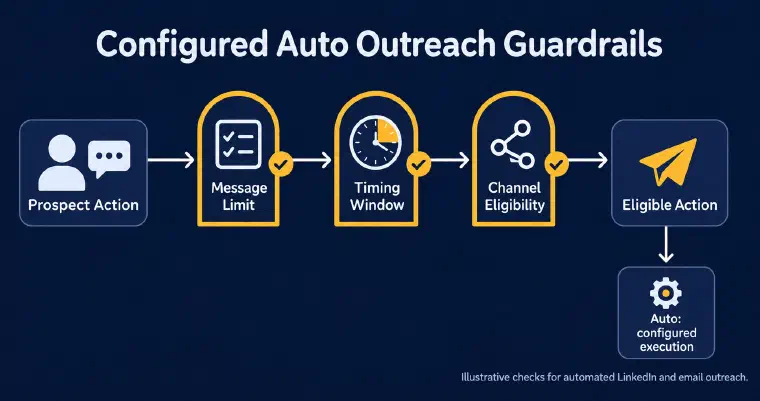
I treat the first automated deployment as a controlled release. I ask the user to review the recommended configuration, include only the intended personas, and watch why I choose each action. Autonomy should expand only when those decisions are consistently sound. Automation is a permission layer on top of my method, not a substitute for designing the method.
My hard stop is simple: when I detect a human reply, I end the automated phase immediately and prevent any further automated follow-up. This rule prevents the most damaging failure in automated outreach: sending a canned nudge while a real conversation is already underway.
Step 4: Treat every reply as a state transition
I do not treat replies as simple positive or negative outcomes. They change what I am allowed to do next.
With LinkedIn or email synchronised, I record detected replies in the prospect history and classify them. A reply other than an automated email reply moves the prospect to Responded and ends its Auto phase. Hot and warm replies trigger an email notification; cold and stop replies remain visible in history and statistics. A stop request prevents further Auto follow-up for that prospect.
I handle an automated email reply differently. I record and classify it without moving the prospect into a responded state, then prospecting continues normally within the configured limits. It is not the same as an email bounce: a permanent bounce invalidates the address for future email actions.
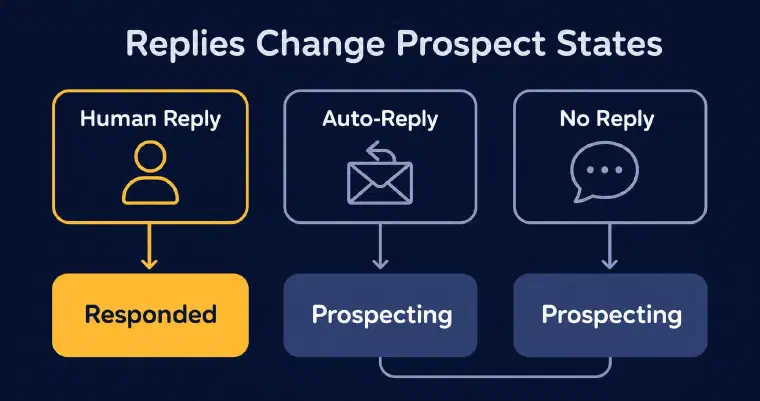
No reply is not permission to send forever. After each delay, I still check the configured message cap and available authorised actions. If you find that generated follow-ups repeat the pitch, review the persona preferences or pause automation to correct them, rather than relying on repetition alone to stop the loop.
Classification confidence needs its own escape hatch. When I cannot classify a reply reliably, I mark it To qualify, notify you, and ask for manual classification. That prospect’s Auto phase ends on the reply; this does not mean automation pauses for every other prospect. I do not conduct the sales conversation after the handoff.
The handoff should give the salesperson the complete thread, the prospect and company context, the current objective, the reply classification, and the reason for the previous next-best action. The goal is continuity. The prospect should not have to repeat information because the conversation moved from an automated phase to a human one.
Step 5: Measure the loop, not the send count
Start with the records available in the product: the automation activity feed, completed actions, prospect histories, and reasons recorded when an Auto phase ends. For a deeper operational audit, you can separately track overdue work or compare eligible versus completed actions. These extra measures require your own analysis rather than a ready-made counter in the dashboard.
My analytics distinguish LinkedIn and email replies and reply rates, calculated from prospects contacted. Read the replies to assess their quality. Comparing results by message angle requires your own review of the messages and histories. A system that sends more touches to the same unresponsive prospects can inflate activity without creating useful conversations.
Use the pipeline views and prospect filters to examine outstanding work, then consult histories and the activity feed to understand what happened. Distinguish a configured wait, a completed Auto phase, and an interruption caused by missing credits or a disconnected channel. Reviewing those records helps you identify what needs attention.
Review the decision trail, not only the copy. Sample why the system chose email over LinkedIn, why it waited, and why it stopped. If those choices are wrong, better prose will not rescue the workflow. Improve the rules that represent the prospect’s current state, the permissions, or the inputs first.
I recommend a narrow review criterion: check whether the loop performs authorised work within the configured limits, hands replies back, and records why an Auto phase ends. Then evaluate the conversations it produces. For a separate discussion of prospecting activity and outcomes, see this analysis of prospecting results.
Common mistakes to avoid
The first mistake I see is bolting generated text onto a fixed cadence and calling it adaptive. I do not consider variable wording a change in decision logic. If every prospect receives step three on day seven, the system is still following a sequence.
The second mistake is letting each channel operate independently. I read email and LinkedIn as one relationship history. A LinkedIn message that ignores yesterday’s email feels repetitive even when both messages look personalised in isolation.
The third mistake is optimising for message completion. I recommend reviewing the actions, replies, recorded stops, and handoffs rather than treating send volume as the result.
The final mistake is treating silence as endless eligibility. I work within limits and accept that no action can be the right action. Once you define the objective, state, permissions, and stopping rules, I can manage continuity without turning persistence into noise. That is the standard I set for an adaptive follow-up loop.