
 B2B lead enrichment has a framing problem. Almost everything written about it is written by enrichment tools, so the question the articles answer is “which tool should you use?” The question that matters for outbound is different: what do I need to know about this person to send them something worth reading?
That’s a narrower question than the tool landscape suggests. And the answer requires a sequencing decision before it requires a tool decision.
What B2B Lead Enrichment Is : And What It Isn’t
Lead enrichment is the process of adding structured data to a list you already have. You start with company names, LinkedIn URLs, or a filtered export from a database, and you append the available fields you need to qualify, prioritize, and reach the people on that list. Adding a field doesn’t by itself establish that it is current or verified.
That definition matters because it establishes what enrichment is not: it’s not lead generation. Finding qualified prospects from scratch, building a list from a database, a LinkedIn search, or a signal-based trigger, is a separate problem with a separate workflow. Enrichment assumes the list already exists. Its job is to make that list actionable. For the mechanics of that sourcing step, from brief to scored profile, see how an AI agent finds and qualifies B2B leads.
The conflation is everywhere. Articles on “B2B lead enrichment” are frequently about lead generation tools that also offer enrichment features. Apollo, ZoomInfo, Clay, these tools do both, which is why the use cases blur. But treating them as the same thing produces a consistent and expensive mistake: running enrichment on leads that should have been disqualified before enrichment ever started.
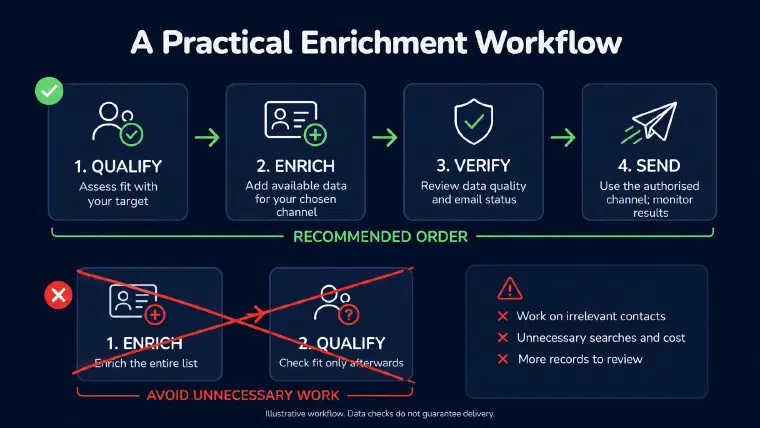
Enrichment can have a cost in provider credits, time, or both. Every paid lookup on an out-of-ICP contact uses resources that could go toward your actual pipeline. My recommended sequence: qualify → enrich → verify → send. Not enrich → look at the data → then decide who fits. That is a preparation method, not a promise that every product includes a separate verification service. I walk through where this step sits inside that full sequence, brief to first reply, in how to prospect with AI, step by step.
The Five Fields That Actually Matter for Outbound
The value of enrichment depends on how much of the enriched data you actually use in the outreach. A record can contain many fields while the message uses only a name and company. I cover what it looks like to actually build the email body from the rest of that record in how AI cold email personalization works.
For outbound prospecting, the fields worth enriching fall into two categories: delivery and context.
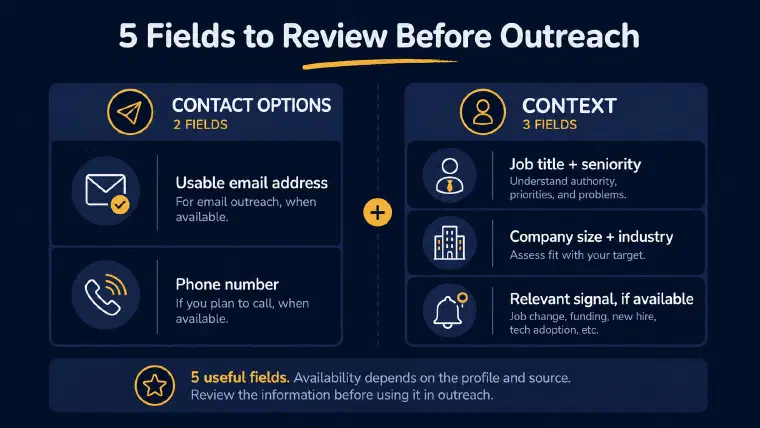
Delivery, two fields:
For email outreach, I prioritize an address checked before sending, without treating that check as a guarantee of delivery. A direct phone number matters if you’re running cold calls in parallel. Neither field is guaranteed to be available for every prospect.
Context, three fields:
Exact job title and seniority level. “Head of Sales” and “Sales Representative” at the same company have different problems, different authority, and different reasons to care about your offer. A message written for one doesn’t land for the other, and you can’t tell the difference without enriching the title.
Company size and industry. ICP confirmation. If the company doesn’t fit your target profile, no enrichment data makes the outreach relevant. This is the filter that should run before enrichment, but at minimum it runs before the message gets written.
One recent signal: a job change, a funding announcement, a new hire in a relevant function, a technology adoption. This field is what moves cold outreach from plausible to timely. It answers the implicit question every prospect asks when they read a cold message: “why me, why now?” Without a credible answer to that question, the message is ambient noise.
Five fields to prioritize, not five fields that every prospect must have. The rest, full technology stack, quarterly revenue estimates, org chart depth, intent signal aggregates, can be useful for multi-touch ABM campaigns where you’re engaging the same account over weeks. For initial cold outbound, I only add that research when it changes qualification or what I would write.
Enrichment vs. Verification : Why the Sequence Matters
Enrichment and verification are different operations. Running one without the other is how teams damage deliverability without realizing it until weeks later.
Enrichment adds contact data, specifically email addresses, to records that didn’t have them. Verification services assess whether an address is likely to accept mail. Their checks and classifications vary, and some results remain uncertain, particularly with catch-all domains.
The problem: a high proportion of populated email fields does not tell you how many addresses are still reachable. Stale or incorrect addresses can produce bounces. Check the results rather than assuming that coverage proves deliverability, and monitor what happens when you send.
My recommended workflow is: enrich → verify → send. Tools like ZeroBounce or NeverBounce handle verification as a separate step. Budget for that check as part of list preparation, while remembering that it cannot guarantee an inbox placement or a reply.
How to Run Waterfall Enrichment Without Clay
Waterfall enrichment is a sequencing strategy: query one data source, take the result when you get one, fall back to the next source only for records that came back empty. Additional sources may fill gaps, depending on their coverage and overlap.
For example, Tool A supplies some addresses, Tool B searches the unresolved records, and Tool C handles the remaining gaps. The result needs to be measured on your own list, not assumed from adding provider coverage claims. Clay made this logic configurable without code, which is why it appears in conversations about B2B lead enrichment tools. But the same logic works without Clay. For teams choosing between building a waterfall and using a prospecting agent that handles enrichment natively, the LEO vs Clay comparison covers that decision directly.
For small lists: consider Apollo first, then Hunter or Findymail for the gaps, after checking current access limits and lookup costs. Log which records came back empty after each pass and run only those through the next tool. Whether the manual approach is economical depends on the list and the time it takes to process it.
For medium lists: compare CSV-based workflow tools and credit-based providers, such as Prospeo, Anymailfinder, or Kaspr, against your volume and budget. The workflow is more mechanical; the relevant question is how much manual handling your team can sustain.
For larger volumes: compare the time spent on manual waterfall with the current cost of Clay or a comparable workflow tool. There isn’t a universal contact-volume threshold at which one becomes cheaper.
One note on geographic coverage: test providers on contacts from your actual target market. If Apollo or ZoomInfo leaves gaps in a European ICP, compare alternatives such as Kaspr, Lusha, or Cognism on the same sample rather than assuming coverage from a brand’s positioning. Building your waterfall sequence with geographic coverage in mind rather than brand recognition is worth the extra setup time.
How Enriched Data Changes the Message : And What Changes When It’s Integrated
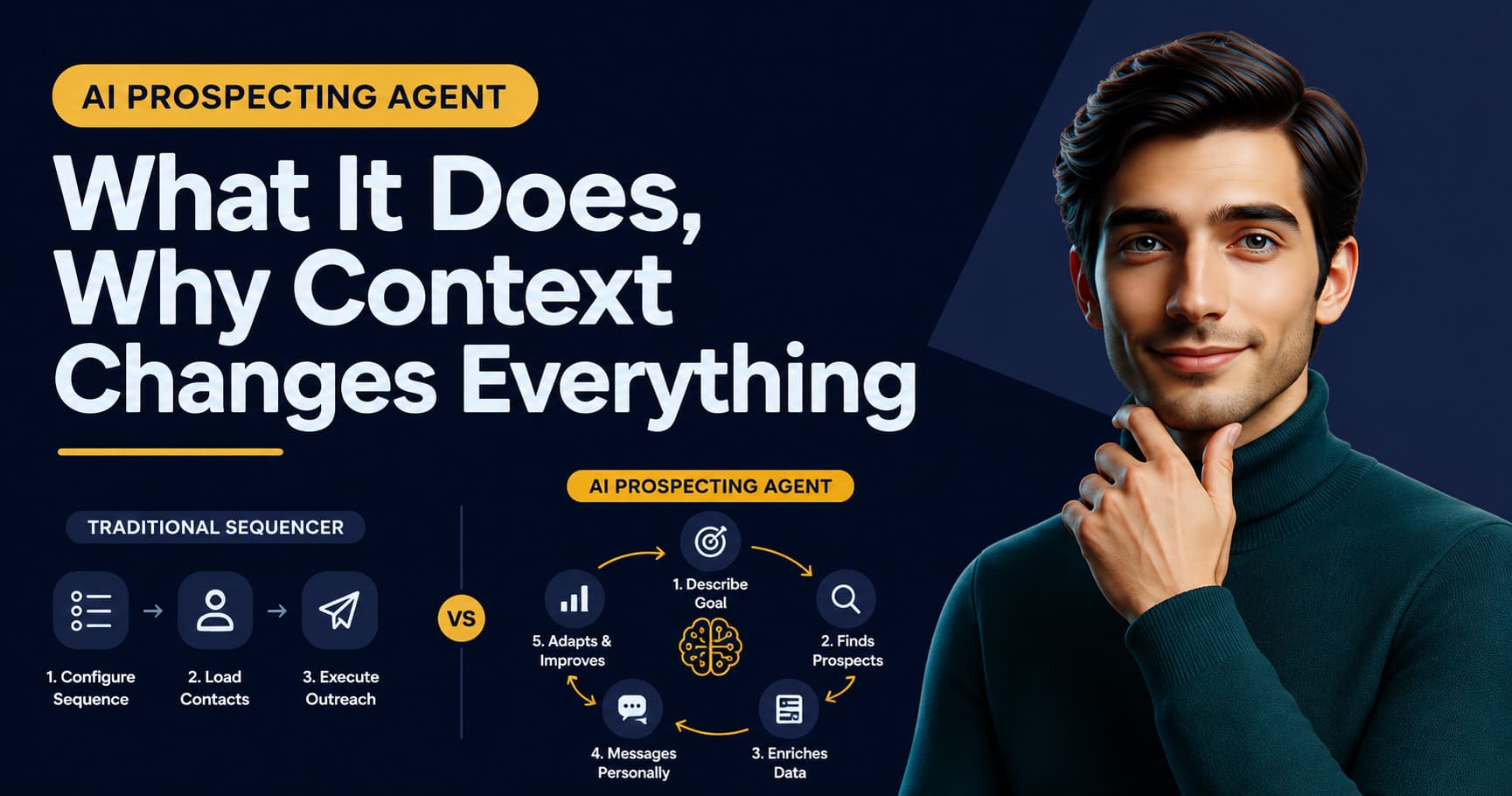
Most enrichment setups follow the same structure: export a contact list, query an enrichment tool, verify with a second tool, import into a sequencer, write a message template. The enriched fields sit in spreadsheet columns. A mail merge pulls first name and company name. The other fields, job title, signal, company context, get used if you’re writing each message manually. If you’re using a template, they mostly don’t.
This is the structural gap in the standard workflow. Enrichment and message-writing are separate steps, often separated by tool switches, CSV exports, and the friction between a data row and a blank message editor. The fields exist. The message doesn’t use them.
That gap is where outreach can lose relevance, and it’s what changes when enrichment is integrated into the prospecting cycle rather than upstream of it. After you validate or import a prospect, I enrich the record with available professional and company information. Roles, responsibilities, company context, and relevant signals can inform the message, but I don’t guarantee that every field or signal will be available. You can review and correct the record before using it.
Detailed prospect and company enrichment consumes no credits. Contact searches are separate: 1 credit when I find a usable email address, 5 when I find a usable phone number, and none for an unsuccessful search. A found address is not a guarantee against bounces. In Auto, I may search for an email when relevant, but I never search for a phone number or place a call.
The job title helps shape the framing alongside your offer, persona, and prospecting preferences. A “Head of Sales” might get a message about pipeline pressure and team performance. An SDR at the same company might get one about quota attainment and time spent on non-selling tasks. Same company, different context. When available and relevant, a recent hire in RevOps or a Series B announcement can also help explain the timing. Those are inputs to review, not proof of the prospect’s priorities.
Here’s a hypothetical example. A Head of Sales at a 45-person SaaS company that raised a Series A six weeks ago could receive a message about scaling outbound, rather than a generic pitch about prospecting tools. An SDR hired two months after that raise could receive something different: a message about working toward quota while a playbook is being built. These are possible angles to assess against the available context, not known facts about either person’s needs. That’s personalization as an output of starting from relevant data.
The point isn’t “I personalize too.” The point is that personalization that depends on a separate enrichment step will always be limited by the gap between what the data shows and what the template allows. When the enrichment and the message generation happen in the same cycle, the data shapes what gets written, not what gets merged in.
Want to see how prospect context shapes my outreach? Book an immersive demo for your activity.
The Enrichment Trap : Why Enriching Before Qualifying Always Costs More
The most common enrichment mistake isn’t a bad tool choice or a missed verification step. It’s enriching before qualifying.
When you pay to enrich a list that hasn’t been filtered for ICP fit, you can spend credits on contacts you’ll later discard. In a hypothetical 1,000-contact list where 600 fall outside your ICP, those 600 records represent avoidable lookups if the disqualifying information was already available. They don’t automatically equal 600 credits: charges depend on the provider and action. The cost also includes time spent reviewing, filtering, and managing a list that could have been smaller from the start.
Start by applying the firmographic criteria you can already assess, such as company size and industry. Research may still be needed to resolve missing information; the point is to avoid paid lookups on contacts you can already rule out. In LEO, detailed enrichment is free, while prospect discovery and successful contact searches have their own credit costs. That distinction matters when estimating the cost of a workflow.
The right sequence is: build list → qualify for ICP fit → enrich the qualified segment → verify → send. Many teams run enrichment first and qualification second, using enriched data to decide who actually fits. By then the cost is already sunk on the full unfiltered list, not just the qualified portion.
The same logic applies to signals: treating a signal as context for an already-qualified account is different from treating it as the reason to qualify one. Intent data, companies actively researching your category, is useful when it aligns with accounts that already match your firmographic profile. Intent signals on companies outside your ICP don’t create urgency. They create noise that makes your enrichment look better than your outreach results.
B2B lead enrichment done right isn’t about building the richest possible lead record. It’s about prioritizing useful contact and context fields, reviewing what is available, and using that information to write a relevant message. Sequence the work so you avoid unnecessary lookups, without assuming that five populated fields guarantee a reply.