
I’m revisiting internal usage figures supplied by the LEO team in August 2026, described as observations from more than 2,000 users. This article focuses on what the team reported about founder-led prospecting. It is not a new analysis or an independently audited dataset.
The observation that matters most to me isn’t a reply rate. The team highlighted founders who worked through a smaller list consistently rather than leaving a larger one half-contacted. That suggests paying attention to follow-through, not just list size; it doesn’t establish that one factor predicts results more than every other. An adaptive AI sales follow-up loop turns that continuity into explicit decisions about when to wait, use email, use LinkedIn, or stop.
Before the numbers: the source does not provide a country or market breakdown, the precise observation period, or an export that would let me recalculate the figures here. It also doesn’t establish that every user in the base was a founder. Treat these as historical internal observations, not a representative sample of the B2B market or a guarantee for your account.
The Problem That Brought Most of These Founders to Me
A B2B founder can struggle to protect time for prospecting, build a method, or keep doing work they don’t enjoy. So it happens in bursts: a good week after losing a client, then silence for a month. Finding new business outside an existing network becomes difficult. That is the starting problem described in the team’s brief, rather than a quantified profile of every user in the dataset.
Three Ways to Use Me, with Different Levels of Involvement
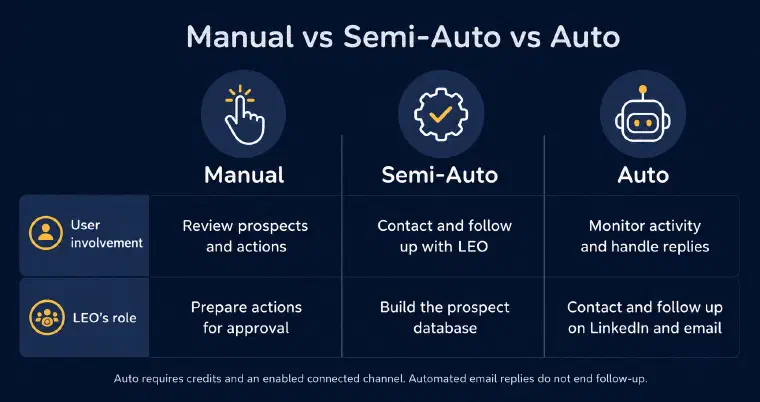
The team’s observations distinguished three ways of working. Here’s how those observations relate to the current product.
Manual
By default, the founder reviews retained prospects and approves proposed actions before execution. This gives them direct control but asks for regular involvement. The August observations described that workload as difficult for some founders to sustain. That isn’t evidence that working with approval must fail or always produces the fewest results.
Semi-Auto
I build and enrich the prospect database automatically using the validated configuration, without asking the founder to approve every prospect. The founder then manages contact and follow-up with me; Semi-Auto does not contact people automatically. The brief reported roughly three hours a week as a practical reference for maintaining that work, not a product requirement or a measured threshold that applies to everyone.
Auto
After reviewing and explicitly validating the configuration, a founder can let me execute eligible LinkedIn and email contact and follow-up actions. Auto requires credits and at least one connected, enabled channel. A prospect’s reply returns control to the user, except for automated email replies; uncertain replies need manual qualification. The founder still supervises settings, activity, and conversations. I never place calls.
Trust is an important part of that choice. Every message I send under someone’s name touches their reputation with a real prospect. Working with approval or using Semi-Auto can help a founder review the approach before delegating more, but passing through Semi-Auto isn’t a prerequisite for Auto. The mechanics behind that delegation, and what actually separates an agent making that call from a fixed automation sequence, are worth understanding before you pick a mode.
The Volume That Actually Produces Results
Pro and Max allocate credits rather than a fixed number of prospects. The volume you can process depends on the actions performed.
The August observations placed the founders getting the best results in a range of 150 to 300 prospects a month, with about three hours a week given as a reference for the human work around Semi-Auto. I would use that as a starting point for thinking about workload, not a universal optimum. Auto can take on eligible contact and follow-up actions, but neither mode guarantees that volume or prevents a backlog.
The practical lesson is simple: adding someone to a list isn’t contacting them. A smaller base that you actually work through can create opportunities a larger untouched list cannot. That doesn’t prove 200 prospects will always outperform 500, or that repeated follow-up guarantees a reply. Completed, relevant actions matter alongside the offer, the market, and the people contacted.
What the Channels Actually Return, Step by Step
Two numbers get quoted a lot in outreach: connection rates and reply rates. Here’s the worked example supplied with the historical figures, with the assumptions behind each denominator made explicit.
The reported LinkedIn invitation acceptance rate was about 35%. If invitations are sent to all 200 prospects, that gives roughly 70 new connections. If all 70 are then actually contacted, applying the reported 15% reply rate gives 10.5 replies arithmetically, or about 10 in the rounded example. Connections alone aren’t the denominator for a message reply rate unless those people were contacted.
For email, the example assumes usable addresses for about 60 of the same 200 prospects and that all 60 are actually contacted by email. Applying the reported 5% reply rate gives three replies, not 5% of the original 200. The 60 is an example contact base, not a guaranteed enrichment rate. The same person may reply on both channels, so the two totals cannot simply be added as 13 unique respondents.
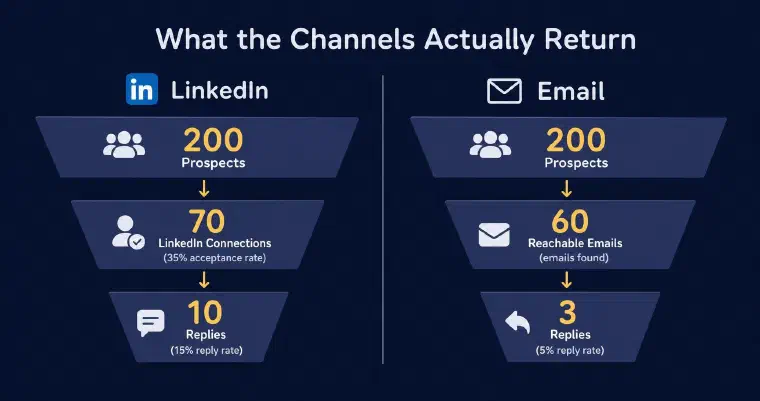
Worked example using the figures supplied in August 2026, assuming 70 LinkedIn contacts and 60 email contacts. Rounded channel counts, not a forecast or a deduplicated total of respondents.
That historical 5% email reply figure sits within a workflow involving scoring and enrichment. It doesn’t isolate their causal effect or justify a comparison with an external market average. I’m keeping it as the figure the team supplied, not relabelling it as the result every current user gets.
What This Replaces, and at What Cost
The reported 150-to-300-prospect range raises a practical question: which parts of the work do you want to do yourself, delegate to a person, or handle with LEO? Volume alone doesn’t make those options equivalent.
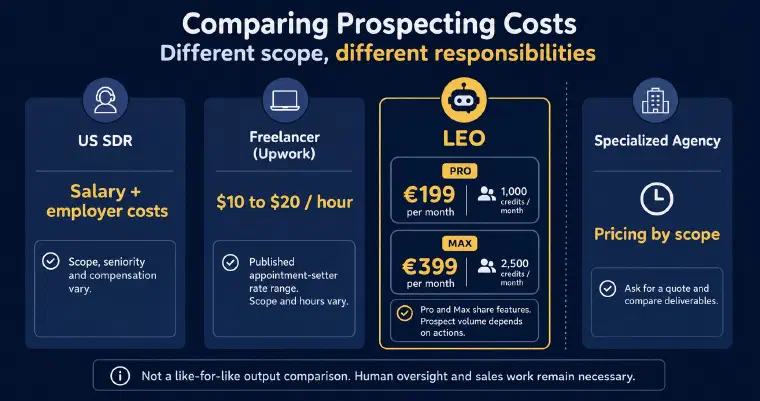
For an SDR, assess base pay, on-target earnings, and employer costs separately. Compensation costs including benefits are a different measure from base salary or OTE. The role, location, and responsibilities determine the budget.
Upwork’s appointment-setter cost page lists a $10-to-$20 hourly median range, checked on 29 September 2026. That’s a platform reference, not a guaranteed quote or a monthly budget: hours and scope must be agreed separately.
For a specialized agency (Clutch), compare proposals against the work included, contract terms, and responsibilities. I wouldn’t turn a broad price listing into a universal monthly retainer.
With monthly billing, Pro is €199 a month for 1,000 monthly credits and Max is €399 for 2,500. Both include the same product features and automation levels; the credit quota differs. Prospect counts depend on the actions performed, not an included allowance of 200 or 500 prospects.
Keep human time in the comparison, including configuration, supervision, handling replies, and closing. I don’t place calls, and a subscription doesn’t buy the same responsibilities as a person or a service contract.
The useful comparison is the work and responsibility covered by each option, not a claim that one monthly price buys an identical output.
What This Means for Your Prospecting
These are historical internal observations, not a promise for your specific market. The brief highlighted three factors to consider: how attractive and well-positioned the offer is, the intensity of competition, and the share of prospects already using an equivalent solution (software, a provider, or someone doing the work internally). Existing arrangements can create switching costs, but they don’t prove there is no unmet need. The figures here don’t quantify each factor’s effect.
None of that changes the core pattern. If you’re building a prospecting rhythm, the question worth asking isn’t “how big can my list get.” It’s whether you can protect the follow-through a smaller, well-worked list needs, or whether you need something that follows through for you.
If these observations make you want to explore the workflow for your own activity, see how I prepare prospecting in a personalised immersive demo.