
La Growth Machine positions itself as the tool that runs LinkedIn, email, calls, and X from one sequence, with cloud execution it markets as safer than browser-extension automation. That pitch has earned it a loyal following among sales ops teams and GTM engineers who want to build their own workflows. This La Growth Machine review looks past that pitch at what the pricing, the user reviews, and the per-identity model actually mean if you’re deciding whether to buy it.
What La Growth Machine Does: And Who It’s Built For
La Growth Machine (LGM) is a multichannel sales automation platform built around cloud execution rather than a browser extension. You design a sequence in a visual builder, chaining LinkedIn actions (visit, connect, message, voice note), cold emails, calls, and X/Twitter messages with conditional branching, and LGM’s cloud infrastructure, running on dedicated mobile proxies per identity, executes it on schedule. Replies from every channel land in one shared inbox.
Getting there takes longer than logging into a template-based tool. You connect each identity, LGM assigns it a dedicated proxy, and new identities go through a warm-up period before they can send at full volume, a safety measure meant to protect the account.
The platform also ships waterfall enrichment, pulling verified contact data across multiple providers to fill the gaps enrichment quality issues tend to leave in a lead list, plus an AI writing layer for generating message drafts and voice notes. LGM has operated since 2017 and reports over 10,000 GTM teams as customers, a self-reported figure from its own homepage rather than an independently audited number.
Who it’s built for: sales ops teams, GTM engineers, and heads of sales who want to design their own multichannel sequences and need LinkedIn, email, calls, and X coordinated in a single tool, rather than stitched together across three separate ones.
What’s Good About La Growth Machine
Genuine multichannel in one workflow builder
Most LinkedIn automation tools handle one channel well and treat the rest as an afterthought. LGM’s visual sequence builder lets you chain LinkedIn, email, calls, and X into a single conditional flow: connect on LinkedIn, wait three days, send a follow-up email if there’s no reply, call if there’s still no response. Reviewers on G2 consistently cite this as the platform’s strongest differentiator against single-channel tools. If your outbound strategy genuinely spans multiple channels and you want to design that logic yourself, this is the most complete builder in the category.
Cloud execution is a different architecture, not a safety guarantee
Unlike Chrome-extension tools that run automation inside your browser session, LGM executes campaigns from the cloud through a dedicated mobile proxy assigned to each identity. This differs from the browser-based approach discussed in my Waalaxy review. LGM markets that architecture as a safety edge, but I would not treat the claim as an independently measured reduction in detection risk. LinkedIn’s rules on prohibited software prohibit third-party tools that automate activity on its website. Cloud routing does not establish permission, and reviewing a message before an automated send does not guarantee account safety either.
A shared inbox that actually centralizes replies
Managing responses across LinkedIn, email, and X separately is one of the most tedious parts of multichannel outreach. LGM’s shared inbox pulls replies from every connected channel into one view, so you’re not toggling between LinkedIn messaging, your email client, and a separate DM tool to track a single conversation. For teams running sequences across more than one channel, this alone removes a meaningful amount of manual tracking work.
La Growth Machine Review: What’s Not Great
The complexity is the product, and you pay for it in time
The flip side of the most complete builder in the category is that you have to build in it. Every campaign starts with a flowchart. Templates give you a head start, but you still pick among branching variants and then decide, step by step, which channel opens, how long to wait, which condition routes a non-reply to email versus a call, and which message fires where. That design work is the thing LGM sells, and it lands entirely on you, once per sequence and again for every segment you want to treat differently.
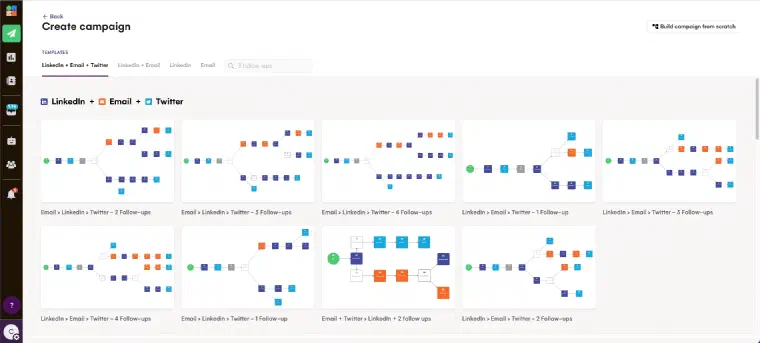
Setup also adds work at the start. Each identity is connected individually, assigned its proxy, and put through a warm-up before it can send at full volume. The time required depends on your setup and the reps you’re onboarding. None of that is a flaw in the engineering; it is part of operating that architecture, not proof that it is safer than a browser extension. The honest comparison isn’t LGM’s price against a cheaper tool’s price. It’s LGM’s price plus the hours your team spends designing and maintaining sequences, against what you’d otherwise get for that time.
One message per campaign, not per prospect
La Growth Machine’s AI copywriting layer, branded Magic Messages, works at the level of the sequence. You fill in a prompt once per campaign, your product, your benefits, your persona, your tone, and it generates the messages for that sequence, which you review before anything goes out. At send time, variables fill in the specifics: first name, company, job title, and roughly two dozen other fields pulled from the lead record.
That saves real drafting time, and LGM markets it as giving you “a unique message for every lead.” It’s worth being precise about what actually varies. The copy is written once per sequence; what changes per prospect is the values slotted into it. A prospect who just raised a round and one who has been quiet for two years get the same argument with a different company name in it. The one exception is LinkedIn Voice, where LGM generates an AI intro per lead on top of your recorded message, and the per-prospect claim holds literally.
This isn’t a defect in the feature, it’s the boundary of what a sequencer can do. A tool built around campaigns personalizes at the campaign level, because that’s the unit it thinks in. But it means the hardest part of outreach, working out what would make this specific person reply, sits outside the product, in the prompt you write before the campaign starts.
Bugs and sync errors are the most repeated complaint
Across G2 and Trustpilot, the same theme surfaces repeatedly: sync errors, messages not sending on schedule, and campaign progress lost mid-edit. One detailed Trustpilot reviewer described a bug that synced emails from one team member’s inbox into another’s, exposing internal communication and damaging the sender’s email reputation in the process. Trustpilot’s rating sits at a notably lower 3.3/5, though the sample is thin (fewer than 10 reviews as of August 2026), which makes it a weaker signal than G2’s larger pool, but the pattern in both matches: the multichannel concept is strong, the execution has reliability gaps.
Pricing: Is It Worth It?
As of August 2026, per lagrowthmachine.com/pricing (verify current prices before purchase, as multichannel tools in this category adjust tiers often):
| Plan | Price/identity/month | Channels | Included |
|---|---|---|---|
| Basic | €60 | LinkedIn, email | 250 leads enriched/mo, up to 3 identities |
| Pro | €120 | LinkedIn, email, calls | 400 leads enriched/mo, rotating inbox, unlimited identities |
| Ultimate | €120 | LinkedIn, email, calls, X | 1,000 leads enriched/mo, CRM sync, dedicated account manager (4+ identities) |
| Custom | From €150/mo | All | 6-identity minimum, 6-month commitment |
Annual billing knocks roughly two months off the price. Extra enrichment credits cost €1 per lead for data only, or €5 per lead for full verified-email enrichment, on top of the plan price.
One thing to check before you pick a tier: Pro and Ultimate carry the identical published price, €120 per identity per month, separated only by channel access and enrichment volume. X/Twitter outreach and CRM sync sit behind Ultimate, so it’s easy to land on Pro assuming you’re paying less for less, and miss that Ultimate offers more capability at no extra list price.
The math works if you’re using most of what you’re paying for: a small team, genuinely running LinkedIn, email, and calls together, staying under a handful of identities. It works less well the moment you scale headcount or only need one channel, since you’re paying multichannel prices for single-channel usage, and per-identity billing means the bill grows exactly as fast as your team does, with no plateau until custom pricing kicks in. That’s the part reviewers flag most often, and the irony in it: the sales ops teams and heads of sales LGM markets itself to are precisely the profiles its pricing model penalizes hardest.
Who Should Use La Growth Machine
La Growth Machine’s ideal user is specific: a sales ops professional or GTM engineer at a small, structured team who wants to design multichannel sequences themselves, genuinely uses LinkedIn, email, and calls or X together, and is comfortable troubleshooting the occasional sync bug in exchange for the most complete workflow builder in the category.
Three profiles where LGM delivers on its promise: a small B2B SaaS sales team running coordinated LinkedIn-to-email-to-call sequences who wants one tool instead of three; a GTM engineer building a custom outreach stack who needs a flexible builder with conditional logic; a founder-led team of two or three that stays under the identity count where per-seat pricing still feels reasonable.
But most B2B teams that grow past that profile run into friction fast. If you’re scaling a sales team past a handful of reps, per-identity pricing turns LGM into one of the more expensive tools in the category of AI-assisted prospecting tools. If you only need one channel, you’re paying for infrastructure you won’t use. And if what you actually want is someone (or something) to decide who to contact and what to say, not a workflow builder you configure yourself, LGM still leaves that work entirely on you, the same gap I cover in my lemlist review for another sequencer built the same way.
The Alternatives: Including LEO
| La Growth Machine | LEO | Waalaxy | lemlist | |
|---|---|---|---|---|
| Type | Multichannel sequencer | AI prospecting agent | LinkedIn sequencer | Email/multichannel sequencer |
| Who designs the sequence | You | LEO recommends the next action | You | You |
| Personalization | Template per sequence | Per-prospect, contextual | Template per campaign | Template per sequence |
| Pricing model | Per identity (€60-€120+) | One User seat per workspace, separate credit allocation | Per seat | Per seat |
| Price entry | €60/identity/mo | Pro €199/mo or Max €399/mo with monthly billing | €19/mo (LinkedIn only) | ~€50/mo |
| LinkedIn actions | Automated, cloud-executed | Sent from your connected account, after your validation or autonomously on Auto | Automated, browser extension | Automated, cloud-executed |
If you’d rather work on your targeting and messages through a conversation, book an immersive demo of my prospecting workflow.
I’m not a sequencer, and I don’t ask you to build one. La Growth Machine gives you a flexible builder and a lot of decisions to make inside it: which channel, which condition, which template, which follow-up. That’s the right tool for someone who wants to design the logic themselves. It’s the wrong tool for someone who wants the targeting and the writing handled, because no amount of workflow sophistication replaces a message written for the specific prospect reading it. I lay out that comparison point by point in LEO vs La Growth Machine.
With me, you do not build a fixed sequence. You review your offer, persona, and prospecting preferences, and I find prospects scored for fit with your offer and persona. I prepare messages using available role, company, and contextual information, then wait for your approval by default. Semi-Auto builds the prospect database while you manage contact and follow-up. Auto performs eligible LinkedIn and email actions after you review and explicitly validate its configuration, with credits and at least one synchronized, enabled channel. It does not search for phone numbers or place calls.
A human reply ends that prospect’s Auto phase and returns control to you. Automated email replies are the exception and allow Auto to continue. If I cannot classify a reply confidently, I mark it To qualify, notify you, and request manual classification. Automation still needs your oversight.
Pro provides 1,000 monthly credits and Max 2,500, with the same features and automation levels. A User in multiple workspaces consumes a seat in each, with a separate credit allocation and prospecting environment. Compare the users, workspaces, channels, and activity you actually need; I do not offer a flat-price team account or guarantee a lower total team cost.
La Growth Machine solves a real problem: coordinating multiple channels without three disconnected tools. It solves it well for teams that want that control and can absorb the per-identity cost, the setup time, and the occasional sync bug. What it doesn’t solve is the harder problem underneath: deciding who to contact and what to actually say to them. That’s still on you, sequence after sequence.
I am built to help you make those decisions through a conversation, then prepare and execute actions at the level of autonomy you choose. If you’re weighing this La Growth Machine review against my approach, the practical choice is between designing a multichannel sequence and reviewing an agent’s recommendations and configuration. Compare that working model alongside the cost of the users and usage your team needs.