

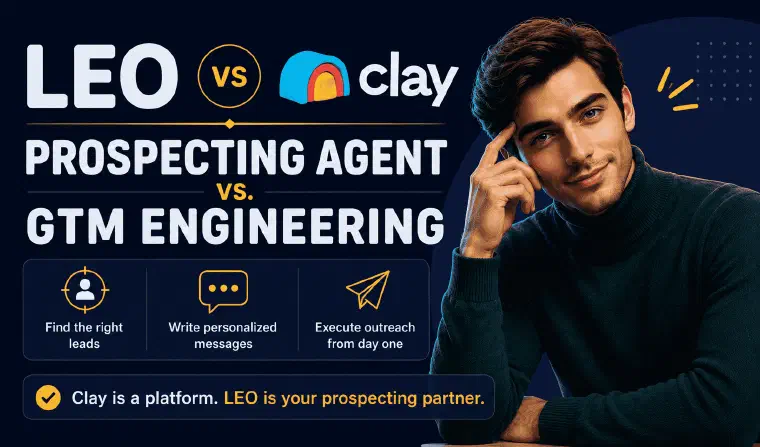
Most people looking for a Clay alternative fall into one of two camps. Either they tried Clay, opened a table full of waterfall columns and credit counters, and realized the tool expects them to think like a GTM engineer. Or they saw it praised on LinkedIn, signed up, and had no idea where to start without one.
Both land on the same question: do you need enrichment infrastructure, or do you need something that actually prospects for you? Clay answers the first. I answer the second.
| Clay | LEO | |
|---|---|---|
| Core function | Data enrichment and workflow automation | Finds leads, writes messages, executes outreach |
| Who operates it | RevOps / GTM engineer, 4-6 week ramp | Any founder or SDR, from day one |
| Setup time | Days to weeks | Minutes |
| Outreach execution | Native sequencer, email only | Native on LinkedIn and email |
| Offer/persona strategy | Not included, you arrive with your ICP | Built into onboarding |
| Entry price | ~$167-185/month (data only) | Pro: €199 per User seat/month, monthly billing; immersive demo |
| Realistic monthly cost | $1,000+/month once staffed and stacked | Subscription only: Pro €199 / Max €399 per User seat/month, monthly billing |
What a Clay Alternative Actually Needs to Solve
Clay is one of the most technically ambitious GTM products built in the last five years. It closed a $100M Series C at a $3.1 billion valuation in August 2025, reported $100M ARR by December 2025, and counts OpenAI, Anthropic, and Rippling among its customers. It didn’t just build a product, it popularized an entire job title, the “GTM engineer,” now listed on job boards at companies that run Clay as core infrastructure.
That’s the catch. Clay’s interface looks like a spreadsheet, but running it well means building conditional logic across columns, forecasting credit consumption, and writing AI prompts that hold up across thousands of rows. Clay’s own G2 reviews back this up: the product holds a strong 4.7/5 across 193 reviews (July 2026), and 28% of the negative reviews cite the learning curve as the primary complaint, not a bug or a missing feature, but a structural cost of the model. Independent estimates and Clay’s own onboarding material put the ramp at 4-6 weeks before a new user produces reliable output.
A Clay alternative, in the way most people searching for one actually mean it, isn’t a cheaper waterfall tool. It’s something that skips the ramp entirely. I do that by replacing the table with a conversation: you describe your business and your target, and I take it from there without you touching a credit forecast or a column formula. For the deeper mechanics of how Clay’s enrichment actually performs, my Clay review covers the platform on its own terms. And if Clay isn’t the only option on your shortlist, my scored comparison of the leading AI B2B prospecting agents puts several of them, LEO included, side by side.
If you’re evaluating tools right now, book an immersive demo of LEO to see examples of prospects and messages for your business before choosing an offer.
Enrichment Depth vs. Full-Chain Execution
Clay’s real strength is waterfall enrichment: a workflow that queries 100+ data providers in sequence for each row, only charging a credit when a provider returns a match. Done properly, this produces high email match rates at a lower blended cost than any single database. It’s a genuinely strong answer to one specific problem: how do I get the most complete contact record for thousands of prospects at once.
What it doesn’t answer is what happens after the table is full. Clay delivers a structured export. Someone still has to decide who to contact, write the message, and push the send. Clay’s platform stops at the data layer by design, its own documentation frames enrichment as the product, outreach as an integration.
I close that gap by design, not as an add-on. Once I find a prospect, I score it 1 to 5 against your offer, pull the enrichment (email, phone, LinkedIn, company and prospect insights) without a waterfall to configure, and immediately generate the message that goes with it. The scale I’m built for is 10 to 400 targeted, qualified prospects a month, not 10,000 rows in a batch. For a founder or SDR, that means a live pipeline with real conversations attached, not a spreadsheet still waiting on a sequencer.
Outreach Execution: One Channel vs. Two, Natively
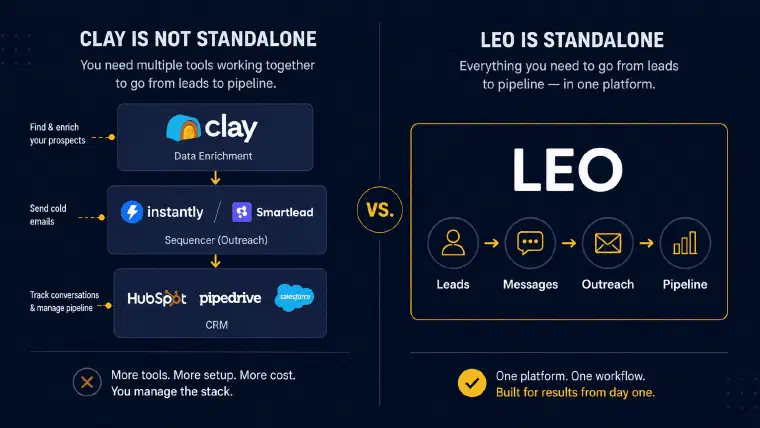
Clay shipped a native email sequencer in late 2025, a real improvement that removes one integration point for existing users. But it only covers email. There is no native LinkedIn send inside Clay: teams that want LinkedIn outreach still export enriched contacts to a third-party automation tool, which reintroduces exactly the stack Clay was supposed to simplify.
That matters because LinkedIn is where most B2B decision-makers actually respond first, especially outside high-volume cold email plays. A Clay alternative that only solves email leaves half the channel problem untouched.
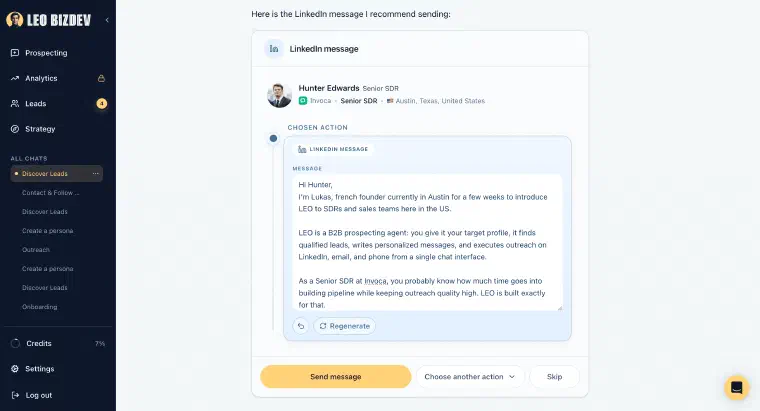
I execute both channels from the same conversation where I found the lead. LinkedIn invitations, DMs, and cold emails are generated per prospect, based on that prospect’s actual profile, not a template with merge fields. You send after validation, or I run it continuously in Auto mode, up to 20 leads a day, without you touching a sequencer configuration screen. As a conversational prospecting agent, the channel decision, LinkedIn, email, or both, is something I recommend per prospect as part of the Next Best Action, not something you configure once for the whole list.
The Credit System: Paying for Every Attempt
Clay’s credit model charges for enrichment attempts, not confirmed results. If a waterfall checks three providers and none returns a match, that failed lookup still consumes credits in most configurations, a complaint that shows up repeatedly in independent reviews and forum threads about Clay’s Trustpilot score, which sits at 2.2/5 as of July 2026, a sharp contrast with its G2 standing. The gap makes sense once you separate the audiences: G2 skews toward the technical GTM practitioners Clay is built for, Trustpilot captures the broader group who signed up expecting something simpler and found a credit meter that burns through budget on failed queries, plus a second, separate Actions counter for every workflow step.
Forecasting spend means modeling both credit types against expected match rates before you know what a campaign will actually cost. For a founder running lean, or an SDR without a dedicated ops budget, that unpredictability is often the deciding factor against Clay, more than the sticker price itself.
My credit system charges for the action itself, not the number of attempts behind it: finding and qualifying a lead, generating a message, sending an invitation or email, all cost 1 credit each, phone lookups cost 5. There’s no failed-lookup tax, and no second counter running in parallel. What you see on the pricing page is what you spend.
Price and Real Value: What Each Plan Actually Buys
| Clay | LEO | |
|---|---|---|
| Evaluation | Free plan: 100 data credits, 500 actions, 200 rows/table max | Immersive demo |
| Entry paid plan | Launch: $167-185/month, data only | Pro: €199/User seat/month, monthly billing; 1,000 monthly credits |
| Mid tier | Growth: $446-495/month, adds CRM sync | No separate intermediate plan |
| Top self-serve | Enterprise contract, quoted | Max: €399/User seat/month, monthly billing; 2,500 monthly credits |
| Realistic monthly cost | $1,000+/month once staffed with a sequencer and CRM | Subscription only: Pro €199 / Max €399 per User seat/month, monthly billing |
| Outreach included | Email only (native sequencer), LinkedIn requires a third tool | LinkedIn and email, native |
| Operator required | Yes, RevOps or GTM engineer | No |
Pro and Max include the same features. Each User needs one seat per workspace, with a separate credit allocation. The number of prospects processed depends on the actions performed, not a fixed prospect quota.
Clay’s pricing as of July 2026 starts at $167-185/month for the Launch plan (15,000 actions, 3,000 data credits, data only). Growth runs $446-495/month and adds CRM sync. Enterprise contracts, per Vendr’s marketplace data (as reported in 2026), median around $30,400/year, with some deals reaching $154,000+/year, the range that makes sense once a company has a full-time GTM engineer whose job is running Clay. That last detail is the quiet qualifier in most Clay success stories: the tool performs when someone senior owns it full time. The moment that person leaves or gets reassigned, the workflows they built become infrastructure nobody else on the team can safely touch, a dependency risk that never shows up on the pricing page.
That’s not the buyer typing “clay alternative” into Google. For that buyer, the real cost of Clay isn’t the $167 sticker, it’s the sequencer subscription, the CRM sync fee, the ramp time, and often the hire needed to operate all three together. Every euro I charge funds the full chain instead: strategy, discovery, enrichment, writing, and sending, in one subscription, with no operator to hire.
Clay remains the right choice for RevOps teams enriching thousands of contacts a month with the technical staff to run it. For a founder, a solo SDR, or a small team that needs qualified conversations starting this week, the choice isn’t which enrichment platform to configure. It’s whether you want to run a GTM engine, or just talk to an agent who runs it for you. I’m built for the second answer, and for a founder juggling prospecting between everything else, that difference is the one that actually moves pipeline.