

When I compare a sales navigator alternative, I look at three needs: finding relevant leads, obtaining usable contact data, and turning that research into outreach. Sales Navigator combines strong LinkedIn search with InMail and message-writing assistance. The distinction here is not whether it can contact anyone. It is whether you want to manage that LinkedIn-led process yourself or work through a connected conversational prospecting workflow.
| LinkedIn Sales Navigator (Core, annual) | LEO | |
|---|---|---|
| Lead discovery | 50+ filters, 1B+ LinkedIn profiles | Sourced and scored against your actual ICP |
| ICP / persona definition | Assumes you already know it | Built through conversation before I search |
| Contact data (email / phone) | Not an email/phone enrichment service | Separate searches, subject to availability and credits |
| AI account/lead summaries | Account IQ, Lead IQ (Advanced+ only) | Insights built directly into the message |
| Message writing | Manual, or Message Assist (Advanced only) | Personalized per prospect, all plans |
| Outreach volume | 50 InMails/month, all tiers | Tied to plan credits, not an InMail cap |
| Sequencing / automation | LinkedIn messaging managed by the user | Approval by default; Semi-Auto builds the database; Auto contacts eligible prospects under your configuration |
| CSV export | Not on Core/Advanced (LinkedIn, Jul 2026) | Native, all plans |
| Pipeline tracking | Saved leads and accounts; CRM integration depends on plan | Prospect table, stages, history and analytics |
| Price (starting) | $89.99/seat/month (annual) | Pro €199/month on monthly billing; a User seat per workspace |
That table is most of the argument. Sales Navigator supports LinkedIn research and contact. I connect prospect discovery with qualification, available enrichment, outreach and reply tracking. For the full breakdown of its tiers, InMail limits, and workflow, see my Sales Navigator review.
Lead Discovery: Why a Sales Navigator Alternative Needs More Than a Bigger Database
Sales Navigator’s search is genuinely strong: 50+ filters (title, seniority, company size, geography, tenure, technologies, growth signals), 1 billion+ profiles, saved searches with daily alerts, and lists that hold up to 10,000 leads. For a rep who already knows exactly who to target, VP of Sales, 50-200 employees, Series B, hiring, it’s the fastest way to build that list.
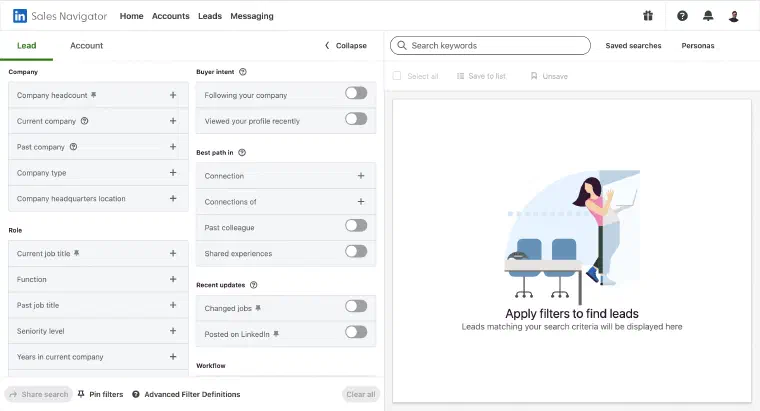
The catch is in that “already knows.” Sales Navigator’s filters assume you’ve done the ICP work somewhere else. It doesn’t ask whether your offer lands better with VPs of Sales or Heads of Revenue, or whether agencies convert better than in-house teams for you specifically. It searches. It doesn’t help you define what to search for in the first place.
I do that part first. I help build your offer and persona from your business context, your website, your LinkedIn, and your notes, for you to review. Then I find prospects and score each one 1-5 stars against both the offer and persona, with a stated reason for the match. In guided discovery, I retain profiles rated at least 3 stars for your validation; lower-rated profiles remain visible and can be rescued. You review the proposed fit before moving to outreach, rather than treating a search match as proof of buying intent.
Contact Data and Outreach: Where Every Sales Navigator Alternative Search Actually Starts
Here’s the distinction I would check first: Sales Navigator offers LinkedIn contact through InMail, with 50 credits per month, but it is not an email-address or phone-number enrichment service (LinkedIn, compare-plans page). Its messaging features do not remove LinkedIn’s platform restrictions. Neither does using me: control over the content or timing of outreach is not a guarantee of platform compliance or account safety.
In practice, Sales Navigator can help you find someone and contact them on LinkedIn. If you want to discover their email address and manage email outreach, you need another workflow. Whether that requires a separate sequencer depends on how you work, not simply on having a Sales Navigator subscription.
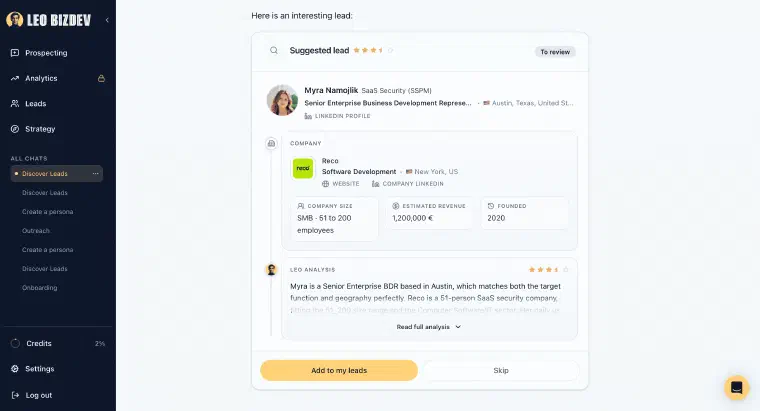
I bring those steps into the same conversation. After validation or import, I enrich available professional and company information. Email and phone searches are separate actions, costing 1 or 5 credits respectively only when a usable result is found. By default, I prepare outreach for your approval and send through a synchronised, eligible channel; without synchronisation, you send manually. Semi-Auto builds the prospect database without contacting anyone automatically.
Auto adds LinkedIn and email outreach after you review and explicitly validate its configuration, with sufficient credits and at least one synchronised and enabled channel. The recommended maximum of 20 new prospects per day is configurable, not a guaranteed output or a message allowance. A human reply ends that prospect’s Auto phase and returns control to you; an automated email reply is recorded without ending it. Uncertain replies are marked To qualify and sent to you for classification. If this workflow addresses the gap you’re evaluating, book an immersive demo for your activity.
AI That Summarizes vs. AI That Decides: Account IQ, Lead IQ, and Next Best Action
Sales Navigator’s newer AI features, Account IQ and Lead IQ, generate quick summaries of a company’s financial health, leadership, and challenges, or an individual lead’s role and recent activity. Worth noting: Account IQ is restricted to Advanced and Advanced Plus plans, works only for English-language profiles, and its summaries can go stale for smaller or less-covered companies (evaboot.com, 2026).
Account IQ and Lead IQ provide research for the decision you make next. Sales Navigator also offers Message Assist for drafting and InMail for contact. I would distinguish those features from a workflow that recommends and prepares the next action using the prospect’s history.
With Next Best Action, I recommend an available move, such as a LinkedIn invitation, message, email search or send, phone search, or call script, and explain why using your offer, persona and the prospect’s context and history. LinkedIn invitations have no note; messages and emails use the available context. Execution follows your selected mode. Phone actions remain manual: I can help find a number and prepare a script, but you place the call, and Auto neither searches for phone numbers nor calls.
Data Ownership: What Happens to Your Pipeline If You Downgrade or Cancel
I would check what happens after paid access ends before building a prospecting process around either product. LinkedIn’s help documentation says cancellation takes effect at the end of the paid cycle, after which saved leads, saved accounts and Sales Navigator messages are inaccessible and cannot be recovered by resubscribing (LinkedIn Help, consulted September 30, 2026). Core and Advanced also have no built-in CSV export; CRM integration is a separate plan consideration.
That’s worth planning for when your budget fluctuates, whether you’re a founder between funding rounds, a solo SDR between contracts, or an agency reassigning seats. Check access and export conditions before ending a subscription, not afterwards.
With me, prospects, available enrichment, stages and action history stay together, and CSV export is included in every active plan without consuming credits. Cancelling leaves full functionality until the end of the paid period. You then have one month of read-only access, without exports, synchronisations or prospecting actions, before business data is deleted. Export the prospect data you need before paid access ends; I do not provide indefinite storage after cancellation.
The operational comparison remains useful: you can connect a database, an enrichment tool like Apollo or Clay, and a sequencer, or manage these steps with me. In either case, access to the tools and retention of your records deserve separate attention.
Pricing: Seats, Features, and Prospecting Credits
Sales Navigator (LinkedIn, compare-plans, verified July 2026):
| Plan | Price | What it includes |
|---|---|---|
| Core | $89.99/seat/mo (annual), $119.99 month-to-month | Advanced search, saved leads/lists, 50 InMails/mo (no contact data, no export) |
| Advanced | $149.99/seat/mo (annual), $159.99 month-to-month | + Account IQ, Lead IQ, TeamLink, buyer intent, one-way CRM sync |
| Advanced Plus | Custom (10-seat minimum) | + Bidirectional CRM sync, Embedded Experiences |
LEO:
| Plan | Monthly billing | Monthly credits |
|---|---|---|
| Pro | €199/month | 1,000 |
| Max | €399/month | 2,500 |
Both plans include the same features and automation levels. Credits reload monthly without rolling over, and the number of prospects you can process depends on the actions performed. Each person operating me uses a User seat per workspace, with a separate credit allocation and prospecting environment. I am not a flat subscription covering an unlimited team.
Compare the users, features and activity you need on each side, rather than comparing several Sales Navigator seats with one LEO User. The Sales Navigator prices above are the historical July 2026 figures, not a new quote for your team.
Sales Navigator can make sense when LinkedIn research and contact fit your existing process. I am built for people who want to define their target, review prospects, prepare outreach and track replies in one conversational workflow. The choice is about how you want to work, not a guaranteed saving or result. If that approach is closer to what you need, book an immersive demo to see it applied to your activity.